System Login
This guide aims to help users set up UART connection for debugging.
Account and Password
Default usernames and passwords for different systems are as follows:
| System | Username | Password |
|---|---|---|
| Debian11 | linaro | linaro |
| Debian11 | root | root |
| Ubuntu20.04 | kickpi | kickpi |
| Ubuntu20.04 | root | root |
Mobaxterm
Board UART Pins
Before performing UART debugging, please locate the UART pins as described.
K3
- 2D Extended Pinout Diagram
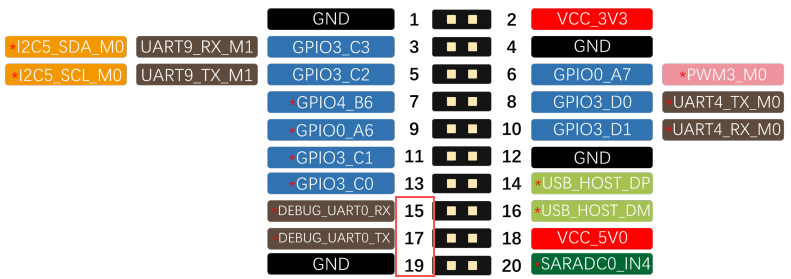
- Diagram

Preparation
- Software: Mobaxterm
- Hardware: Serial Debug Cable
Note
Red: VCC (Not needed for connection); Green: TX; White: RX; Black: GND
.jpg)
Connection Setup
K3
- Image Example

Mobaxterm Configuration
- Click "Session" to create a new session window.
- Select the session window type as 'Serial'.
- Select the serial COM port number (Check the COM number in the Windows Device Manager -> Ports section).
- Set the Speed (bps) to 1500000.
-
Start the session window.
-
As shown in the figure,After clicking OK, you will enter the command line input window.

When the board is powered on and connected to the computer, Mobaxterm will display the information output of the development board during startup.

Once the connection is successfully established, press Enter in the command line interface to input commands.

At this point, we have successfully connected to the development board's terminal via the serial port. Now we can use various commands to control and debug the development board.
ADB
Android supports the use of ADB functionality. ADB (Android Debug Bridge) is a development and debugging bridge tool for the Android system. It supports connecting devices via USB or network, enabling device management and debugging operations such as application installation, file transfer, and command execution.
Preparation
- Hardware: Double male USB Type-C cable
- Software: ADB_Tool
Connection Setup
- K3 Installation Diagram: Connect one end of the Type-C data cable to the motherboard and the other end to the personal host computer.

ADB Installation
1.Extract the adb-tools.rar archive, for example, to the D:\ADB\adb-tools directory.
2.Open the cmd window and navigate to the extracted directory.
3.Run the command. Successful execution indicates a successful installation.

4.Enable ADB debugging.