ANDROID_SDK COMPILATION
SDK Introduction
SDK (Software Development Kit) is a collection of development tools provided for a specific software framework, hardware platform, or operating system, designed to help developers create applications more efficiently.
Compilation Host Configuration
Install Ubuntu on a PC to perform SDK compilation.
- Hardware: PC must meet RAM ≥ 16 GB, CPU cores ≥ 4, Hard Drive ≥ 500GB.
- Software: Ubuntu 22.04, allocate ≥ 200GB disk space for virtual machines.
Install dependencies.
sudo apt-get update
sudo apt install autoconf bc binfmt-support bison build-essential bzip2
sudo apt install chrpath cmake cpp-aarch64-linux-gnu curl device-tree-compiler diffstat
sudo apt install expat expect expect-dev fakeroot flex
sudo apt install g++ g++-multilib gawk gcc gcc-multilib git gnupg gperf gpgv2 imagemagick
sudo apt install lib32ncurses5-dev lib32readline-dev lib32z1-dev libgmp-dev
sudo apt install libgucharmap-2-90-dev liblz4-tool libmpc-dev
sudo apt install libncurses5-dev libsdl1.2-dev libssl-dev libwxgtk3.0-gtk3-dev
sudo apt install libxml2 libxml2-utils live-build lzop
sudo apt install make module-assistant ncurses-dev openjdk-8-jdk
sudo apt install patchelf pngcrush python2 python-is-python3 python-pip
sudo apt install qemu-user-static rsync schedtool squashfs-tools ssh sudo
sudo apt install texinfo u-boot-tools unzip
sudo apt install xsltproc yasm zip zlib1g-dev pip
sudo pip install pyelftools
sudo ln -s /usr/bin/python2 /usr/bin/python
Obtaining SDK Source Code
Note
1. The SDK cannot be compiled in a shared directory.
2. The compilation host cannot log in using the ROOT account.
3. The RK3576 Android SDK source code is not publicly available; please contact KICKPI official to obtain it.
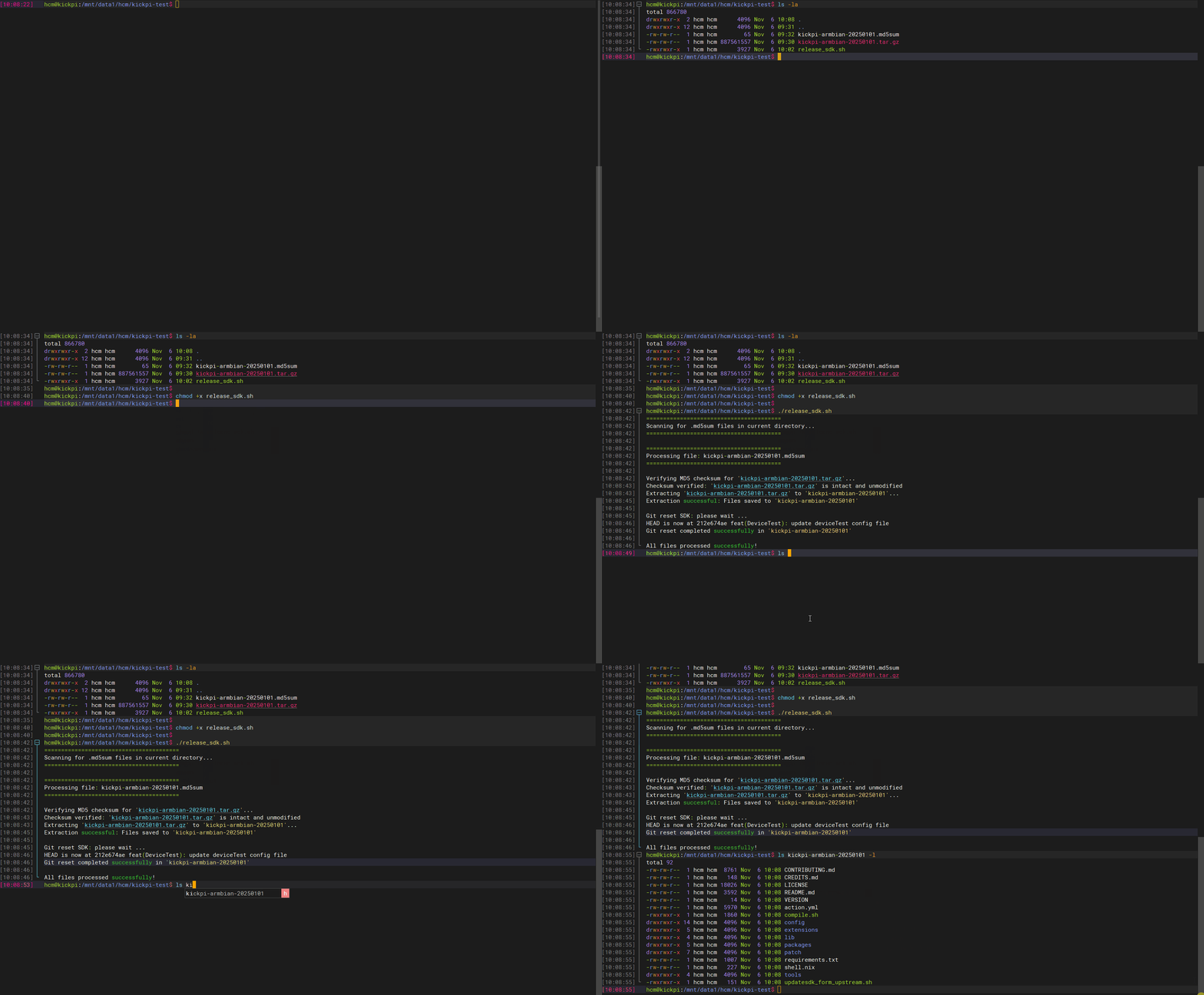
1. Download the Android SDK source code. Download the release_sdk.sh script. Typically, download the file with the latest date suffix.
2. Place the tar.gz package, md5sum file, and release_sdk.sh file in the same directory on the compilation host.
3. Run the script to restore the SDK source code.
Full Compilation
1. Navigate to the code path on the compilation host and execute the following command to configure the compilation target.
Select based on the corresponding main SOC and configuration file.
| Board | SOC | Configuration File |
|---|---|---|
| K7 | rk3576 | BoardConfig-rk3576-kickpi-k7.mk |
| K7C | rk3576 | BoardConfig-rk3576-kickpi-k7c.mk |
Example of configuring the environment for K7:
./build.sh lunch
will lunch sdk

You're building on Linux
Lunch menu...pick a combo:

1. rk3576
Which would you like? [0]: 1

You're building on Linux
Lunch menu...pick a combo:

1. BoardConfig.mk
2. BoardConfig-rk3576-kickpi-k7.mk
Which would you like? [0]: 2
switching to board: /home/huangcm/A/sdk/rk3576-android14.0/device/rockchip/rk3576/BoardConfig-rk3576-kickpi-k7.mk
2. Compile the standard full image.
Individual Compilation
Compile Multi-screen Recognition Image
Compile Uboot Individually
Compile Android Individually
Compile Kernel Individually
Configure Kernel defconfig
Q&A
- Android compilation error due to path errors caused by code location changes
Clear the data first, then recompile.
- Insufficient Compilation Space
The default thread count is currently -j32. Compile by reducing the number of threads, add the -J flag followed by the thread count to the build command.