Build LINUX_SDK Source Code
SDK (Software Development Kit) is a collection of development tools provided for a specific software framework, hardware platform, or operating system, designed to help developers create their own solutions more efficiently.
Build Environment
Install Ubuntu on a PC for SDK compilation.
- Hardware: PC with RAM ≥ 16 GB, CPU cores ≥ 4, Hard Drive ≥ 500GB
- Software: Ubuntu 22.04, Virtual Machine disk space allocation ≥ 200GB
Configuration and Installation
sudo apt-get update
sudo apt install autoconf bc binfmt-support bison build-essential bzip2
sudo apt install chrpath cmake cpp-aarch64-linux-gnu curl device-tree-compiler diffstat
sudo apt install expat expect expect-dev fakeroot flex
sudo apt install g++ g++-multilib gawk gcc gcc-multilib git gnupg gperf gpgv2 imagemagick
sudo apt install lib32ncurses5-dev lib32readline-dev lib32z1-dev libgmp-dev
sudo apt install libgucharmap-2-90-dev liblz4-tool libmpc-dev
sudo apt install libncurses5-dev libsdl1.2-dev libssl-dev libwxgtk3.0-gtk3-dev
sudo apt install libxml2 libxml2-utils live-build lzop
sudo apt install make module-assistant ncurses-dev openjdk-8-jdk
sudo apt install patchelf pngcrush python2 python-is-python3 python-pip
sudo apt install qemu-user-static rsync schedtool squashfs-tools ssh sudo
sudo apt install texinfo u-boot-tools unzip
sudo apt install xsltproc yasm zip zlib1g-dev pip
sudo apt-get install binfmt-support qemu-user-static --reinstall
sudo pip install pyelftools
sudo ln -s /usr/bin/python2 /usr/bin/python
SDK Source Code Access
Note
1. The SDK cannot be built in a HOST shared directory if using virtual machine as building env.
2. Do NOT build SDK as ROOT user.
1. Download the Linux SDK source code and the release_sdk.sh script. Usually, download the file with the latest date suffix.
2. Place the tar.gz package, md5sum file, and release_sdk.sh file in the same directory on the compilation host.
3. Run the script to restore the SDK source code.
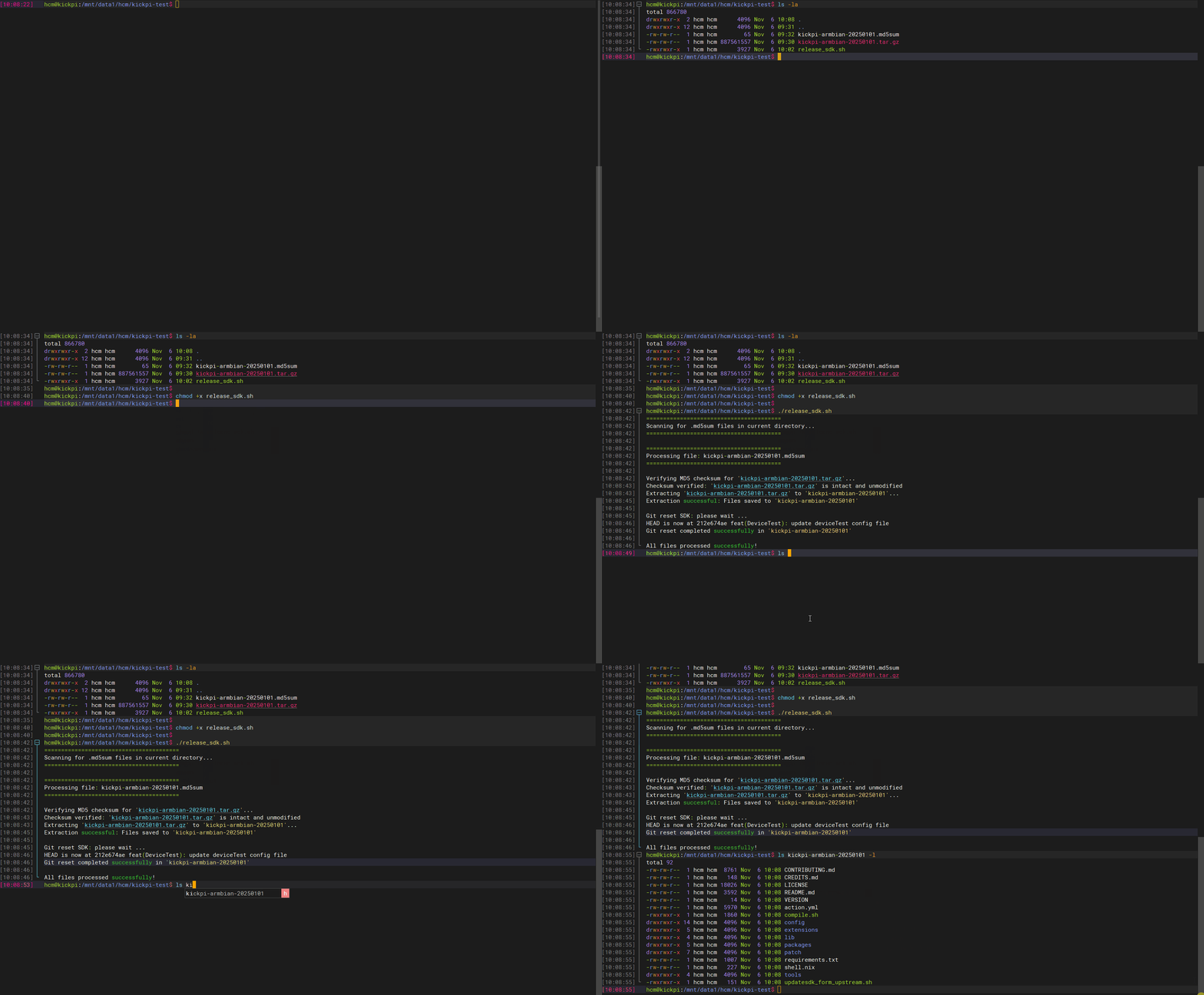
Obtain the Rootfs image
- Download the Rootfs. Usually, download the file with the latest date suffix.
buildroot-dl
buildroot-dl-*.tar.gz: This is the offline dl library package, used to save time during the first compilation.
Debian Rootfs Image
Note
1. KICKPI only provides the Debian desktop version system image.
2. The name and directory of the Debian image file must be rk356x-linux/debian/linaro-rootfs.img.
Before building full image, the Debian filesystem needs to be extracted and placed in the specified directory. Reference steps:
tar -zxvf linaro-rootfs-*.tar.gz
cp linaro-rootfs.img rk356x-linux/debian/
ls rk356x-linux/debian/linaro-rootfs.img
Ubuntu Rootfs Image
Note
1. KICKPI only provides the Ubuntu desktop version system image.
2. The name and directory of the Ubuntu image file must be rk356x-linux/ubuntu/ubuntu-rootfs.img.
Before building full image, the Ubuntu filesystem needs to be extracted and placed in the specified directory. Reference steps:
tar -zxvf ubuntu-rootfs-*.tar.gz
mkdir -p rk356x-linux/ubuntu/
cp ubuntu-rootfs.img rk356x-linux/ubuntu/
ls rk356x-linux/ubuntu/ubuntu-rootfs.img
Full Compilation
Note
The SDK source code provides compilation for the buildroot system but does not provide buildroot system maintenance.
1. Enter the root directory of the SDK source code and execute the following command to configure the compilation target.
Select the configuration file according to the board model and system.
| Board | System | Configuration File |
|---|---|---|
| K1 | debian11 | rockchip_rk3568_kickpi_k1_debian_defconfig |
| K1 | ubuntu20.04 | rockchip_rk3568_kickpi_k1_ubuntu_defconfig |
| K1B | debian11 | rockchip_rk3568_kickpi_k1b_debian_defconfig |
| K1B | ubuntu20.04 | rockchip_rk3568_kickpi_k1b_ubuntu_defconfig |
| K3 | debian11 | rockchip_rk3562_kickpi_k3_debian_defconfig |
| K3 | ubuntu20.04 | rockchip_rk3562_kickpi_k3_ubuntu_defconfig |
| K8 | debian11 | rockchip_rk3588_kickpi_k8_debian_defconfig |
| K8 | ubuntu20.04 | rockchip_rk3588_kickpi_k8_ubuntu_defconfig |
Example of configuring the K1 Debian compilation environment:
./build.sh lunch
Log saved at /home/work/rockchip/rk356x-linux/output/sessions/2025-11-07_15-52-37

Pick a chip:

1. rk3566_rk3568
2. rk3588
Which would you like? [1]: 1
Switching to chip: rk3566_rk3568
Pick a defconfig:

1. rockchip_defconfig
2. rockchip_rk3562_kickpi_k3_buildroot_defconfig
3. rockchip_rk3562_kickpi_k3_debian_defconfig
4. rockchip_rk3562_kickpi_k3_ubuntu_defconfig
5. rockchip_rk3568_kickpi_k1_buildroot_defconfig
6. rockchip_rk3568_kickpi_k1_debian_defconfig
7. rockchip_rk3568_kickpi_k1_ubuntu_defconfig
8. rockchip_rk3568_kickpi_k1b_buildroot_defconfig
9. rockchip_rk3568_kickpi_k1b_debian_defconfig
10. rockchip_rk3568_kickpi_k1b_ubuntu_defconfig
Which would you like? [1]: 6
Switching to defconfig: /home/work/rockchip/rk356x-linux/device/rockchip/.chip/rockchip_rk3568_kickpi_k1_debian_defconfig
make: Entering directory '/home/work/rockchip/rk356x-linux/device/rockchip/common'
#
# configuration written to /home/work/rockchip/rk356x-linux/output/.config
#
make: Leaving directory '/home/work/rockchip/rk356x-linux/device/rockchip/common'
2. Full image compilation.
Other Commands
Multi-screen Recognition Image Compilation
uboot Compilation
Kernel defconfig Configuration
kernel Compilation
kernel Multi-screen Recognition Compilation