Android OTA Update
Patch Information
Ensure the following modifications are in build.sh:
diff --git a/build.sh b/build.sh
index 95b62fe30b..13d54e0763 100755
--- a/build.sh
+++ b/build.sh
     echo "Start pack image"
     cd android
     pack
+    rm out/target/product/ceres-c3/ceres_c3-full_ota*.zip
+    pack4dist
+    mv out/target/product/ceres-c3/ceres_c3-full_ota-eng.*.zip out/target/product/ceres-c3/ceres_c3-full_ota-eng_$(date +%Y%m%d)_$(date +%H%M).zip
     cd -
 }
Note
1. The OTA package is generated after executing pack4dist.
2. Final path of the full OTA package after compilation: android/out/target/product/ceres-c3/ceres_c3-full_ota-eng_*.zip
Prerequisites
1. When powered by battery, ensure sufficient battery level during the update; when operating without a battery, the DTS must disable battery power supply.
                                battery_power_supply: battery-power-supply {
                                        compatible = "x-powers,axp803-battery-power-supply";
-                                       status = "okay";
+                                       status = "disabled";

                                        pmu_chg_ic_temp = <0>;
                                        pmu_battery_rdc= <93>;
Warning
1. This option is enabled by default in the software to be compatible with both boot scenarios (with and without battery).
2. When operating without a battery, this option must be disabled to support OTA updates. Otherwise, the OTA update will detect a low battery level and cause the update to fail.
2. Ensure the build date of the OTA package image is newer than the build date of the existing image on the mainboard.
Tip
Ensure make installclean is enabled during compilation so that the prop information is updated correctly.
--- a/build.sh
+++ b/build.sh
@@ -100,7 +100,7 @@ function build() {
         echo "Start build Android"
         rm -vf longan/out/*.img
         cd android
-        # make installclean
+        make installclean
         make BUILD_NUMBER=ido-a133 -j64
         if [ $? -eq 0 ]; then
             echo "Build android ok!"
Update Process
1. First, ensure the OTA package and mainboard information meet the prerequisites.
2. Place the OTA package in the /sdcard/ directory.
Note
ADB method: adb push ceres_c3-full_ota-eng_.zip /sdcard/
USB copy method: cp /mnt/udisk/.zip /sdcard/
3. In the system, navigate to Setting -> System -> Advanced -> Local Update.
Note
Command line method: adb shell am start -n com.softwinner.update/com.softwinner.update.MainActivity
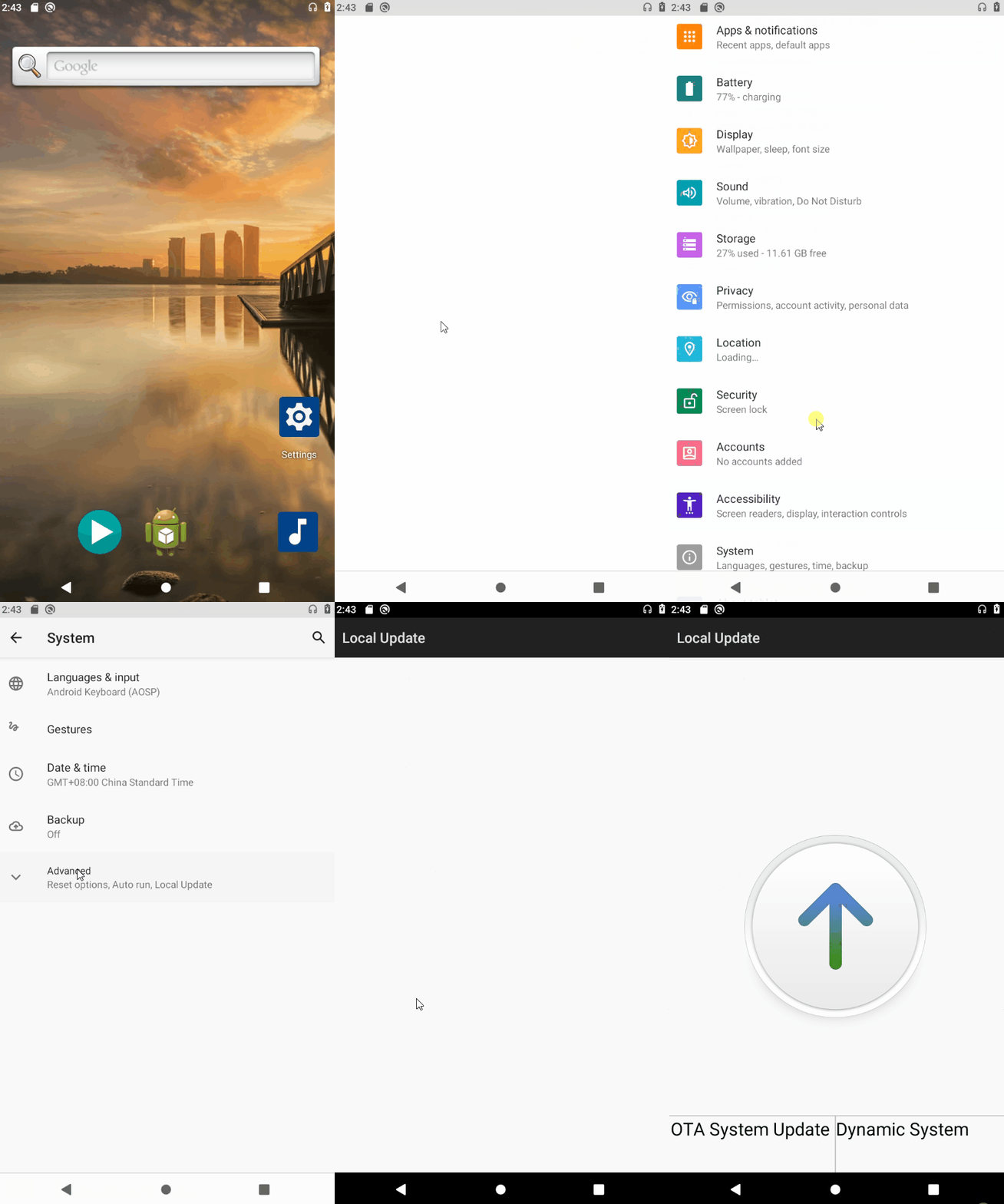
4. Select "OTA System Update".

5. Select the corresponding OTA package and wait for verification.

6. Click "Start install".

7. Click "OK" and wait for the update to complete.

8. After the update completes, verify the changes by checking new functionalities or the system build properties.
Q&A
- OTA Update Fails?
1. Confirm that the prerequisites are met.
2. Check the update logs, specifically the last_log file in /cache/recovery/, to find the cause.