Linux NPU YOLOv5s Object Detection
| Motherboard | SoC | Platform |
|---|---|---|
| K3B | RK3562 | Rockchip |
| K11C | RK3566 | Rockchip |
| K1 / K1B / K1Mini | RK3568 | Rockchip |
| K8 / K8D | RK3588 | Rockchip |
| K10B | A733 | Allwinner |
Allwinner
The Allwinner platform provides YOLOv5s examples through the AW NPU Model Zoo, including complete PC-side model conversion scripts and board-side C code demos.
Resources
| Resource | Path |
|---|---|
| Docker image | linux_aw_npu/docker/ubuntu-npu_v2.0.10.2.tar.zip |
| Model Zoo (v0.8.0) | linux_aw_npu/model_zoo/v0.8.0/ |
| YOLOv5s example | linux_aw_npu/model_zoo/v0.8.0/examples/yolov5 |
| YOLOv5s ONNX model | linux_aw_npu/model_zoo/v0.8.0/examples/yolov5/convert_model/yolov5s_rt.onnx |
| Pre-converted NBG (A733) | linux_aw_npu/nbg_models/yolov5s_rt_uint8_a733.nb |
| Test image | linux_aw_npu/model_zoo/v0.8.0/examples/yolov5/model/dog.jpg |
| gcc-arm-10.2-2020.11 | linux_aw_npu/toolchain/ |
PC-Side Model Conversion
Note
Tested on Windows Ubuntu 22.04.
# 1. Extract and load the Docker image
cd ~/linux_aw_npu/docker
unzip ubuntu-npu_v2.0.10.2.tar.zip
sudo docker load -i ubuntu-npu_v2.0.10.2.tar

# 2. Start the container, mounting the model zoo
sudo docker run --ipc=host -itd \
  -v ~/linux_aw_npu/model_zoo/v0.8.0:/workspace \
  --name npu_env ubuntu-npu:v2.0.10.2 /bin/bash

# 3. Enter the container and run the conversion
sudo docker exec -it npu_env /bin/bash
export ACUITY_PATH=$HOME/acuity-toolkit-whl-6.30.22/bin
export VIV_SDK=$HOME/Vivante_IDE/VivanteIDE5.11.0/cmdtools
cd /workspace/examples/yolov5/convert_model
./convert_model_env.sh
./pegasus_import.sh yolov5s_rt         # Import ONNX
./pegasus_quantize.sh yolov5s_rt uint8 12  # uint8 quantisation
./pegasus_export_ovx_nbg.sh yolov5s_rt uint8 a733  # Export A733 NBG
# Output: /workspace/examples/yolov5/model/yolov5s_rt_uint8_a733.nb
Platform parameter mapping:
| Platform | --optimize Parameter |
|---|---|
| A733 / T736 | VIP9000NANODI_PLUS_PID0X1000003B |
| T527 / MR527 | VIP9000NANOSI_PLUS_PID0X10000016 |
| MR536 / T536 | VIP9000NANODI_PLUS_PID0X1000003B |
| V85x / R853 | VIP9000PICO_PID0XEE |
PC-Side Cross-Compilation
Note
Tested on Windows Ubuntu 22.04.
Official gcc-arm-10.2-2020.11 download link. Use gcc-arm-10.2-2020.11 (glibc 2.31) on the PC for cross-compilation; the binaries can run directly on K10B Debian 11. The toolchain is pre-placed in ~/.
# Configure the toolchain for model zoo
cd ~/linux_aw_npu/model_zoo/v0.8.0
mkdir -p 0-toolchains/gcc-arm-10.2-2020.11-x86_64-aarch64-none-linux-gnu
ln -sf ~/linux_aw_npu/toolchain/gcc-arm-10.2-2020.11-x86_64-aarch64-none-linux-gnu/* 0-toolchains/gcc-arm-10.2-2020.11-x86_64-aarch64-none-linux-gnu/

# Compile (-s debian11 specifies the Debian-compatible toolchain)
cd examples/yolov5
rm -rf build_linux_aarch64 install
../build_linux.sh -t a733 -s debian11

# Push and run
adb push install/yolov5_demo_linux_a733/yolov5_demo_a733 /tmp/
adb push ~/linux_aw_npu/nbg_models/yolov5s_rt_uint8_a733.nb /tmp/
adb push ~/linux_aw_npu/model_zoo/v0.8.0/common/npuruntime/lib_linux_aarch64/A733/*.so /tmp/
adb shell "cd /tmp && LD_LIBRARY_PATH=. ./yolov5_demo_a733 -nb yolov5s_rt_uint8_a733.nb -i model/dog.jpg"
Board-Side Inference Test
# Push NBG to the board
adb push ~/linux_aw_npu/nbg_models/yolov5s_rt_uint8_a733.nb /tmp/

# Create test configuration
adb shell "echo '[network]' > /tmp/test.txt && echo '/tmp/yolov5s_rt_uint8_a733.nb' >> /tmp/test.txt && echo '[input]' >> /tmp/test.txt && echo '/aw-test/npu/vpm_run/input_0.dat' >> /tmp/test.txt"

# Run inference
adb shell "vpm_run -s /tmp/test.txt -l 5 -d 0 -b 1"
Expected output:
input 0 dim 3 640 640 1
ouput 0 dim 80 80 85 3
ouput 1 dim 40 40 85 3
ouput 2 dim 20 20 85 3
create network 0: 7844 us.
run time for this network 0: 20375 us.
profile inference time=20096us
vpm run ret=0
Board-Side Native Compilation of C Demo
K10B Debian 11 comes with gcc and libopencv-dev, so you can compile and run directly on the board without a cross-toolchain.
# Push source code to the board
adb shell "mkdir -p /tmp/yolov5_build/model"
adb push ~/linux_aw_npu/model_zoo/v0.8.0/examples/yolov5/*.cpp /tmp/yolov5_build/
adb push ~/linux_aw_npu/model_zoo/v0.8.0/examples/yolov5/*.h /tmp/yolov5_build/
adb push ~/linux_aw_npu/model_zoo/v0.8.0/common/npuruntime/npulib.* /tmp/yolov5_build/
adb push ~/linux_aw_npu/model_zoo/v0.8.0/common/npuruntime/npu_util.* /tmp/yolov5_build/
adb push ~/linux_aw_npu/model_zoo/v0.8.0/common/npuruntime/include/vip_lite*.h /tmp/yolov5_build/
adb push ~/linux_aw_npu/model_zoo/v0.8.0/common/npuruntime/lib_linux_aarch64/A733/*.so /tmp/yolov5_build/
adb push ~/linux_aw_npu/nbg_models/yolov5s_rt_uint8_a733.nb /tmp/yolov5_build/model/
adb push ~/linux_aw_npu/model_zoo/v0.8.0/examples/yolov5/model/dog.jpg /tmp/yolov5_build/model/

# Compile on the board
adb shell "cd /tmp/yolov5_build && g++ -std=c++11 -O2 *.cpp -o yolov5_demo -I. -L. -lNBGlinker -lVIPhal \$(pkg-config --cflags --libs opencv4) -lm -ldl"

# Run inference
adb shell "cd /tmp/yolov5_build && LD_LIBRARY_PATH=. ./yolov5_demo -nb model/yolov5s_rt_uint8_a733.nb -i model/dog.jpg"
Expected output (K10B A733):
input  0 dim 3 640 640 1
output 0 dim 80 80 85 3
output 1 dim 40 40 85 3
output 2 dim 20 20 85 3
create network 0: 13257 us
run time: 21611 us
detection num: 3
 16: 92%, [134, 226, 307, 545], dog
  7: 69%, [471,  77, 689, 173], truck
  1: 52%, [162, 125, 559, 423], bicycle

Board-Side Video Inference Demo
Based on OpenCV VideoCapture, this demo reads frames from a video file and runs NPU inference on each frame. Source code is located at ~/linux_aw_npu/model_zoo/v0.8.0/examples/yolov5_video/.
Native compile and run on the board:
# Push source code to the board
adb shell "mkdir -p /tmp/yolov5_video"
for f in main.cpp CMakeLists.txt model_config.h; do
  adb push ~/linux_aw_npu/model_zoo/v0.8.0/examples/yolov5_video/\$f /tmp/yolov5_video/
done
for f in yolov5_pre.cpp yolov5_post.cpp; do
  adb push ~/linux_aw_npu/model_zoo/v0.8.0/examples/yolov5/\$f /tmp/yolov5_video/
done
adb push ~/linux_aw_npu/model_zoo/v0.8.0/common/npuruntime/npulib.* /tmp/yolov5_video/
adb push ~/linux_aw_npu/model_zoo/v0.8.0/common/npuruntime/npu_util.* /tmp/yolov5_video/
adb push ~/linux_aw_npu/model_zoo/v0.8.0/common/npuruntime/include/vip_lite*.h /tmp/yolov5_video/
adb push ~/linux_aw_npu/model_zoo/v0.8.0/common/npuruntime/lib_linux_aarch64/A733/*.so /tmp/yolov5_video/
adb push ~/linux_aw_npu/nbg_models/yolov5s_rt_uint8_a733.nb /tmp/yolov5_video/

# Compile
adb shell "cd /tmp/yolov5_video && g++ -std=c++11 -O2 main.cpp yolov5_pre.cpp yolov5_post.cpp npulib.cpp npu_util.cpp -o yolov5_video_demo -I. -I/tmp/yolov5_video -L. -lNBGlinker -lVIPhal \$(pkg-config --cflags --libs opencv4) -lm -ldl"

# Push video to the board (prepare your own video file)
adb push video.mp4 /tmp/yolov5_video.mp4

# Run inference (display on desktop)
# Video inference
adb shell "export DISPLAY=:0 && cd /tmp/yolov5_video && LD_LIBRARY_PATH=. ./yolov5_video_demo -nb yolov5s_rt_uint8_a733.nb -i /tmp/yolov5_video.mp4"

# Real-time camera inference (-i 0 refers to /dev/video0)
adb shell "export DISPLAY=:0 && cd /tmp/yolov5_video && LD_LIBRARY_PATH=. ./yolov5_video_demo -nb yolov5s_rt_uint8_a733.nb -i 0"
The inference window displays real-time detection results (press q or ESC to exit).

Expected output (300 frames, K10B A733):
model=yolov5s_rt_uint8_a733.nb, video=/tmp/yolov5_video.mp4
...
frame 1/300: 20866 us
frame 2/300: 20459 us
...
frame 300/300: 21023 us
avg: 20866 us (47.9 FPS)
Rockchip
The RK platform supports YOLOv5s object detection via rknn_model_zoo and RKNPU2 SDK.
Official reference documentation: rknn-toolkit2 · rknn_model_zoo
PC-Side Cross-Compilation
Environment Setup
Tip
Replace SDK_DIR with the actual SDK directory path.
export TOOL_CHAIN=SDK_DIR/prebuilts/gcc/linux-x86/aarch64/gcc-arm-10.3-2021.07-x86_64-aarch64-none-linux-gnu/
export GCC_COMPILER=SDK_DIR/prebuilts/gcc/linux-x86/aarch64/gcc-arm-10.3-2021.07-x86_64-aarch64-none-linux-gnu/bin/aarch64-none-linux-gnu
Compile the Image Demo
Select the appropriate script based on the target IC:
Output: install/rknn_yolov5_demo_Linux/
Board-Side Inference Test
Image Detection
Tip
person @ / bus @ indicate the recognised object labels.
./rknn_yolov5_demo model/RK3588/yolov5s-640-640.rknn model/bus.jpg
post process config: box_conf_threshold = 0.25, nms_threshold = 0.45
Read model/bus.jpg ...
img width = 640, img height = 640
Loading mode...
sdk version: 1.5.2 (c6b7b351a@2023-08-23T15:28:22) driver version: 0.9.2
model input num: 1, output num: 3
  index=0, name=images, n_dims=4, dims=[1, 640, 640, 3], n_elems=1228800, size=1228800, w_stride = 640, size_with_stride=1228800, fmt=NHWC, type=INT8, qnt_type=AFFINE, zp=-128, scale=0.003922
  index=0, name=output, n_dims=4, dims=[1, 255, 80, 80], n_elems=1632000, size=1632000, w_stride = 0, size_with_stride=1638400, fmt=NCHW, type=INT8, qnt_type=AFFINE, zp=-128, scale=0.003860
  index=1, name=283, n_dims=4, dims=[1, 255, 40, 40], n_elems=408000, size=408000, w_stride = 0, size_with_stride=491520, fmt=NCHW, type=INT8, qnt_type=AFFINE, zp=-128, scale=0.003922
  index=2, name=285, n_dims=4, dims=[1, 255, 20, 20], n_elems=102000, size=102000, w_stride = 0, size_with_stride=163840, fmt=NCHW, type=INT8, qnt_type=AFFINE, zp=-128, scale=0.003915
model is NHWC input fmt
model input height=640, width=640, channel=3
once run use 31.119000 ms
loadLabelName ./model/coco_80_labels_list.txt
person @ (209 244 286 506) 0.884139
person @ (478 238 559 526) 0.867678
person @ (110 238 230 534) 0.824685
bus @ (94 129 553 468) 0.705055
person @ (79 354 122 516) 0.339254
loop count = 10 , average run  23.615900 ms
Video Stream Detection
Tip
Requires an H.264 or H.265 video bitstream.
Tip
car @ / bus @ indicate the recognised object labels in the video.
./rknn_yolov5_video_demo model/RK3588/yolov5s-640-640.rknn model/yolov5_test.h264 264
Loading mode...
sdk version: 1.5.2 (c6b7b351a@2023-08-23T15:28:22) driver version: 0.9.2
model input num: 1, output num: 3
  index=0, name=images, n_dims=4, dims=[1, 640, 640, 3], n_elems=1228800, size=1228800, fmt=NHWC, type=INT8, qnt_type=AFFINE, zp=-128, scale=0.003922
  index=0, name=output, n_dims=4, dims=[1, 255, 80, 80], n_elems=1632000, size=1632000, fmt=NCHW, type=INT8, qnt_type=AFFINE, zp=-128, scale=0.003860
  index=1, name=283, n_dims=4, dims=[1, 255, 40, 40], n_elems=408000, size=408000, fmt=NCHW, type=INT8, qnt_type=AFFINE, zp=-128, scale=0.003922
  index=2, name=285, n_dims=4, dims=[1, 255, 20, 20], n_elems=102000, size=102000, fmt=NCHW, type=INT8, qnt_type=AFFINE, zp=-128, scale=0.003915
model is NHWC input fmt
model input height=640, width=640, channel=3
mpi_dec_test start mpi_dec_test decoder test start mpp_type 7 app_ctx=0x7fc1305278 decoder=0x23ad0100
read video size=720664
...
once run use 26.630000 ms
loadLabelName ./model/coco_80_labels_list.txt
car @ (380 412 438 461) 0.868004
car @ (532 362 574 399) 0.866127
car @ (496 328 530 354) 0.736625
bus @ (748 272 806 329) 0.527151
...
Board-Side Compilation and Execution
Debian 11
Local Video Stream Decoding
Note
This demo is currently available for RK3568 and RK3588. Ubuntu systems may have library compatibility issues and are not supported at this time.
Pre-built test program:
The YOLOv5s object detection demo is pre-installed in the Debian 11 filesystem:
cd /rockchip-test/npu2/rknn_yolov5_demo_Linux/
./rknn_yolov5_demo model/RK356X/yolov5s-640-640.rknn model/test.mp4
Obtain the source code:
ls external/rknpu2/examples/rknn_yolov5_video_demo/
    build  build-android_RK356X.sh  build-android_RK3588.sh  build-linux_RK356X.sh  build-linux_RK3588.sh
    CMakeLists.txt  convert_rknn_demo  include  install  model  README.md  src
Compile the source code:
export TOOL_CHAIN=SDK_DIR/prebuilts/gcc/linux-x86/aarch64/gcc-arm-10.3-2021.07-x86_64-aarch64-none-linux-gnu/
export GCC_COMPILER=SDK_DIR/prebuilts/gcc/linux-x86/aarch64/gcc-arm-10.3-2021.07-x86_64-aarch64-none-linux-gnu/bin/aarch64-none-linux-gnu
cd external/rknpu2/examples/rknn_yolov5_video_demo/
./build-linux_RK356X.sh
Output: install/rknn_yolov5_demo_Linux/
Tip
The /lib directory of rknn_yolov5_demo_Linux must use the one from /rockchip-test/npu2/rknn_yolov5_demo_Linux/lib on the board.
If you do not need to compile, you can obtain the pre-built executable directly from the cloud storage.
Example usage:
cd rknn_yolov5_demo_Linux/
export LD_LIBRARY_PATH=/usr/local/opencv4/lib/
export PKG_CONFIG_PATH=$PKG_CONFIG_PATH:/usr/local/opencv4/lib/
export PKG_CONFIG_LIBDIR=$PKG_CONFIG_LIBDIR:/usr/local/opencv4/lib/pkgconfig
cp /rockchip-test/npu2/rknn_yolov5_demo_Linux/lib . -rf
./rknn_yolov5_demo model/RK356X/yolov5s-640-640.rknn model/test.mp4
Program execution:
Tip
On RK356X platforms, the frame rate may be limited to around 7 FPS. You can optimise the program performance further.
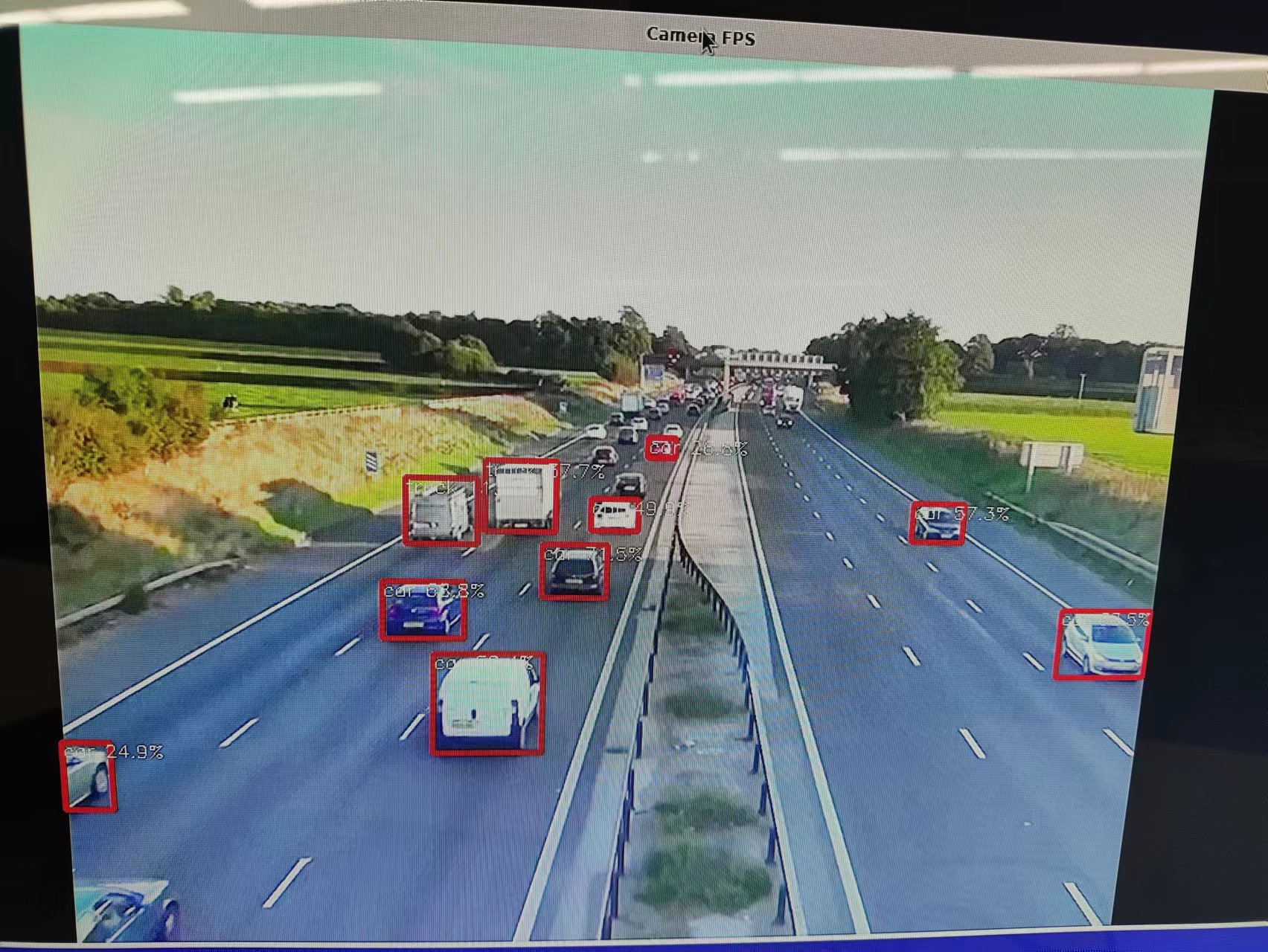
Camera Video Stream Decoding
Note
This demo is currently available for RK3568 and RK3588. Ubuntu systems may have library compatibility issues and are not supported at this time.
Pre-built test program:
Tip
Running for an extended period may cause the process to be terminated due to insufficient memory.
Obtain the source code:
ls external/rknpu2/examples/rknn_yolov5_video_demo/
    build  build-android_RK356X.sh  build-android_RK3588.sh  build-linux_RK356X.sh  build-linux_RK3588.sh
    CMakeLists.txt  convert_rknn_demo  include  install  model  README.md  src
Debian 12 / Ubuntu 24.04
Camera and Video Stream Decoding
YOLOv5 download link:
yolov5_video_demo download link
Install dependencies:
Compilation:
Note
yolov5_video is compiled natively on the board.
Source code description:
main_camera.cc: capture from camera
main_gst.cc: capture via GStreamer (preferred on Ubuntu)
Choose one of these, rename it to main.cc, then compile.
rknn_model_zoo/examples/yolov5_video/cpp
├── CMakeLists.txt
├── camera_preview.cpp
├── main.cc
├── main_camera.cc
├── main_gst.cc
├── postprocess.cc
├── postprocess.h
├── rknpu1
│   └── yolov5.cc
├── rknpu2
│   ├── yolov5.cc
│   └── yolov5_rv1106_1103.cc
└── yolov5.h
On RK Linux Ubuntu 24.04, GStreamer MPP hardware encoding/decoding and Chromium MPP hardware encoding/decoding conflict with each other. Only one can be enabled at a time.
To use GStreamer MPP, run the following fix script. After applying, Chromium will no longer use hardware encoding/decoding:
Compilation process:
Test video stream inference:
rknn_model_zoo/install/rk356x_linux_aarch64/rknn_yolov5_video_demo$ ./rknn_yolov5_demo model/yolov5s_relu_rk3566.rknn model/yolo.mp4

Test camera inference:
rknn_model_zoo/install/rk356x_linux_aarch64/rknn_yolov5_video_demo$ ./rknn_yolov5_demo model/yolov5s_relu_rk3566.rknn 0
