LINUX_SDK COMPILATION
SDK (Software Development Kit) is a set of development tools provided for a specific software framework, hardware platform, or operating system, aimed at helping developers create applications more efficiently.
Compilation Environment Setup
Install Ubuntu 22.04 on a PC for SDK compilation.
- Hardware: PC with RAM ≥ 16 GB, CPU cores ≥ 4, Hard Drive ≥ 500GB
- Software: Ubuntu 22.04, virtual machine disk space allocation ≥ 200GB
Configuration Installation:
Tip
If errors occur during dependency installation, search for the corresponding dependency packages based on the error messages.
sudo apt-get update
sudo apt install autoconf bc binfmt-support bison build-essential bzip2
sudo apt install chrpath cmake cpp-aarch64-linux-gnu curl device-tree-compiler diffstat
sudo apt install expat expect expect-dev fakeroot flex
sudo apt install g++ g++-multilib gawk gcc gcc-multilib git gnupg gperf gpgv2 imagemagick
sudo apt install lib32ncurses5-dev lib32readline-dev lib32z1-dev libgmp-dev
sudo apt install libgucharmap-2-90-dev liblz4-tool libmpc-dev
sudo apt install libncurses5-dev libsdl1.2-dev libssl-dev libwxgtk3.0-gtk3-dev
sudo apt install libxml2 libxml2-utils live-build lzop
sudo apt install make module-assistant ncurses-dev openjdk-8-jdk
sudo apt install patchelf pngcrush python2 python-is-python3 python-pip
sudo apt install qemu-user-static rsync schedtool squashfs-tools ssh sudo
sudo apt install texinfo u-boot-tools unzip
sudo apt install xsltproc yasm zip zlib1g-dev pip
sudo apt-get install binfmt-support qemu-user-static --reinstall
sudo pip install pyelftools
sudo ln -s /usr/bin/python2 /usr/bin/python
Obtaining the SDK Source Code
Note
- The SDK must not be compiled in a shared directory.
- The compilation host must not be logged in as the ROOT user.
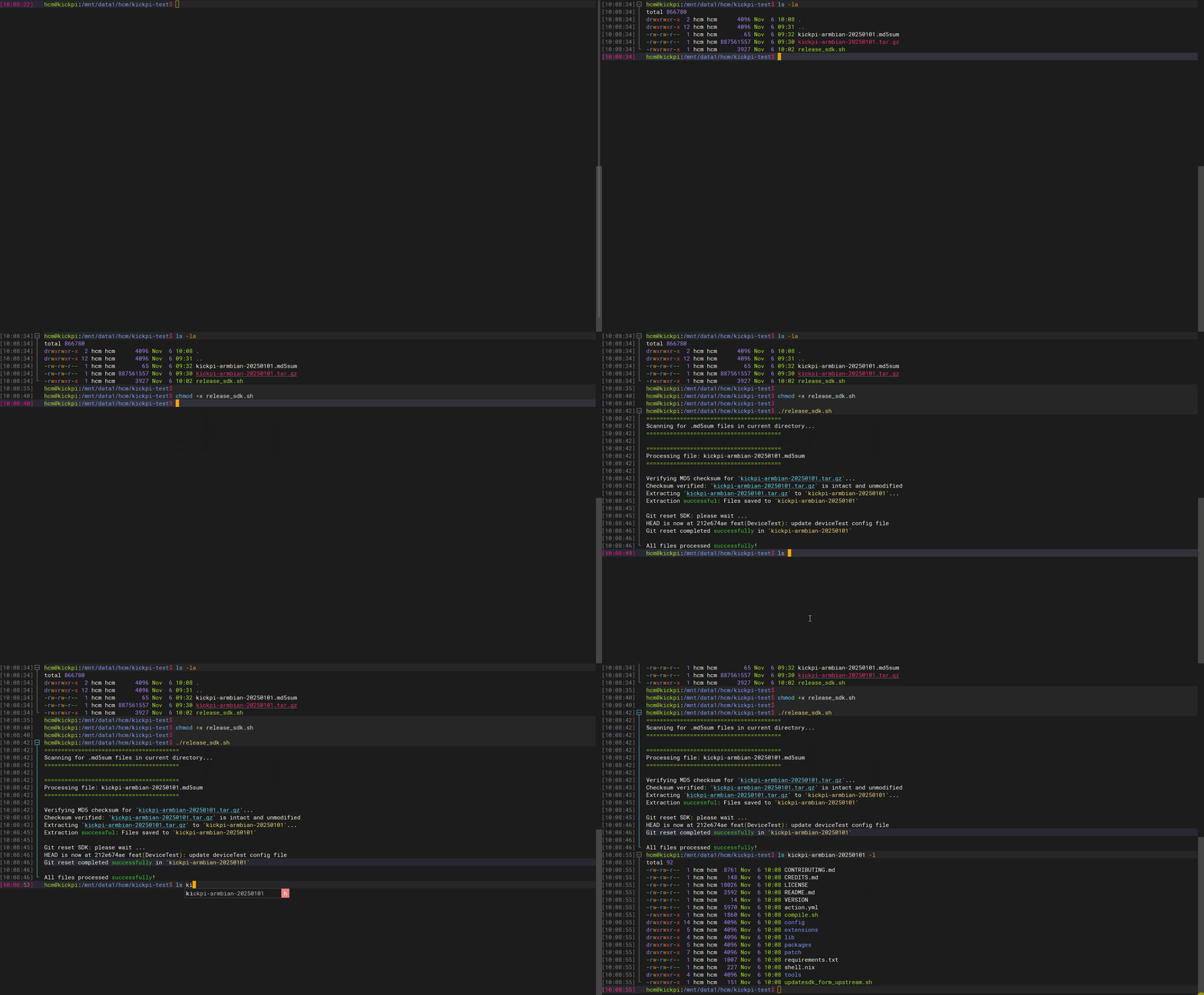
1. Click to download the Linux SDK source code and release_sdk.sh script. Typically, download the latest file with the most recent date suffix.
2. Place the tar.gz package, md5sum file, and release_sdk.sh file in the same directory on the compilation host.
3. Run the script to extract the SDK source code.
Illustration
Full Compilation
Tip
Currently, the A733 Linux SDK source code only maintains the Debian 11 system.
1. Enter the SDK source code root directory and execute the following command to configure the compilation target.
Select the configuration file.
a733-linux$ ./build.sh lunch
All available ic:
   0. a733
Choice [0]: 0
All available board configurations:
   0. BoardConfig-a733-kickpi-k10b-debian11.mk
Choice [0]: 0
2. Compile the complete image.
Separate Compilation
The SDK supports compiling individual modules such as the kernel, modules, device tree, U-Boot, rootfs, etc., without needing a full recompilation each time.
Tip
Before separate compilation, you must first run ./build.sh lunch to select the board configuration.
| Command | Description |
|---|---|
| ./build.sh kernel | Compile the kernel |
| ./build.sh modules | Compile kernel modules |
| ./build.sh dtb | Compile the device tree |
| ./build.sh bootimg | Compile boot.img |
| ./build.sh brandy | Compile U-Boot |
| ./build.sh bootloader | Same as above |
| ./build.sh debian_rootfs | Compile Debian root filesystem |
| ./build.sh rootfs | Compile rootfs (generic) |
| ./build.sh arisc | Compile ARISC coprocessor firmware |
| ./build.sh menuconfig | Kernel configuration menu |
| ./build.sh uboot_menuconfig | U-Boot configuration menu |
| ./build.sh pack | Package the firmware |
| ./build.sh pack_debug | Package debug firmware |
| ./build.sh clean | Clean compilation artifacts |
| ./build.sh distclean | Deep clean |
| ./build.sh all-lcd | Iterate through all LCD configurations and compile sequentially (kernel + packaging) |