Android_SDK Compilation
SDK (Software Development Kit) is a collection of development tools provided for a specific software framework, hardware platform, or operating system, designed to help developers create their own solution more efficiently.
Build Environment
Install Ubuntu on a PC for SDK compilation.
- Hardware: PC with RAM ≥ 16 GB, CPU cores ≥ 4, Hard Drive ≥ 500GB
- Software: Ubuntu 22.04, Virtual Machine disk space allocation ≥ 200GB
Configuration and Installation
sudo apt-get update
sudo apt install autoconf bc binfmt-support bison build-essential bzip2
sudo apt install chrpath cmake cpp-aarch64-linux-gnu curl device-tree-compiler diffstat
sudo apt install expat expect expect-dev fakeroot flex
sudo apt install g++ g++-multilib gawk gcc gcc-multilib git gnupg gperf gpgv2 imagemagick
sudo apt install lib32ncurses5-dev lib32readline-dev lib32z1-dev libgmp-dev
sudo apt install libgucharmap-2-90-dev liblz4-tool libmpc-dev
sudo apt install libncurses5-dev libsdl1.2-dev libssl-dev libwxgtk3.0-gtk3-dev
sudo apt install libxml2 libxml2-utils live-build lzop
sudo apt install make module-assistant ncurses-dev openjdk-8-jdk
sudo apt install patchelf pngcrush python2 python-is-python3 python-pip
sudo apt install qemu-user-static rsync schedtool squashfs-tools ssh sudo
sudo apt install texinfo u-boot-tools unzip
sudo apt install xsltproc yasm zip zlib1g-dev pip
sudo pip install pyelftools
sudo ln -s /usr/bin/python2 /usr/bin/python
Fetch SDK Source Code
Note
1. The SDK cannot be built in a HOST shared directory if using virtual machine as building env.
2. Do NOT build SDK as ROOT user.
1. Download the Android SDK source code and release_sdk.sh and the script. Usually, select the file with the latest date suffix.
| SDK Version | Supported Boards | Maintained? |
|---|---|---|
| Android 13 | RK356x–RK3588 full series | No |
| Linux | RK356x–RK3588 full series | No |
| Android 14 | Only supports K1 MINI, K11C, K8D, K8C | Yes |
| linux‑kernel‑6.1 | Only supports K1 MINI, K11C, K8C, K8D | Yes |
2. Place the tar.gz package, md5sum file, and release_sdk.sh file in the same directory on the compilation host.
3. Run the script to restore the SDK source code.
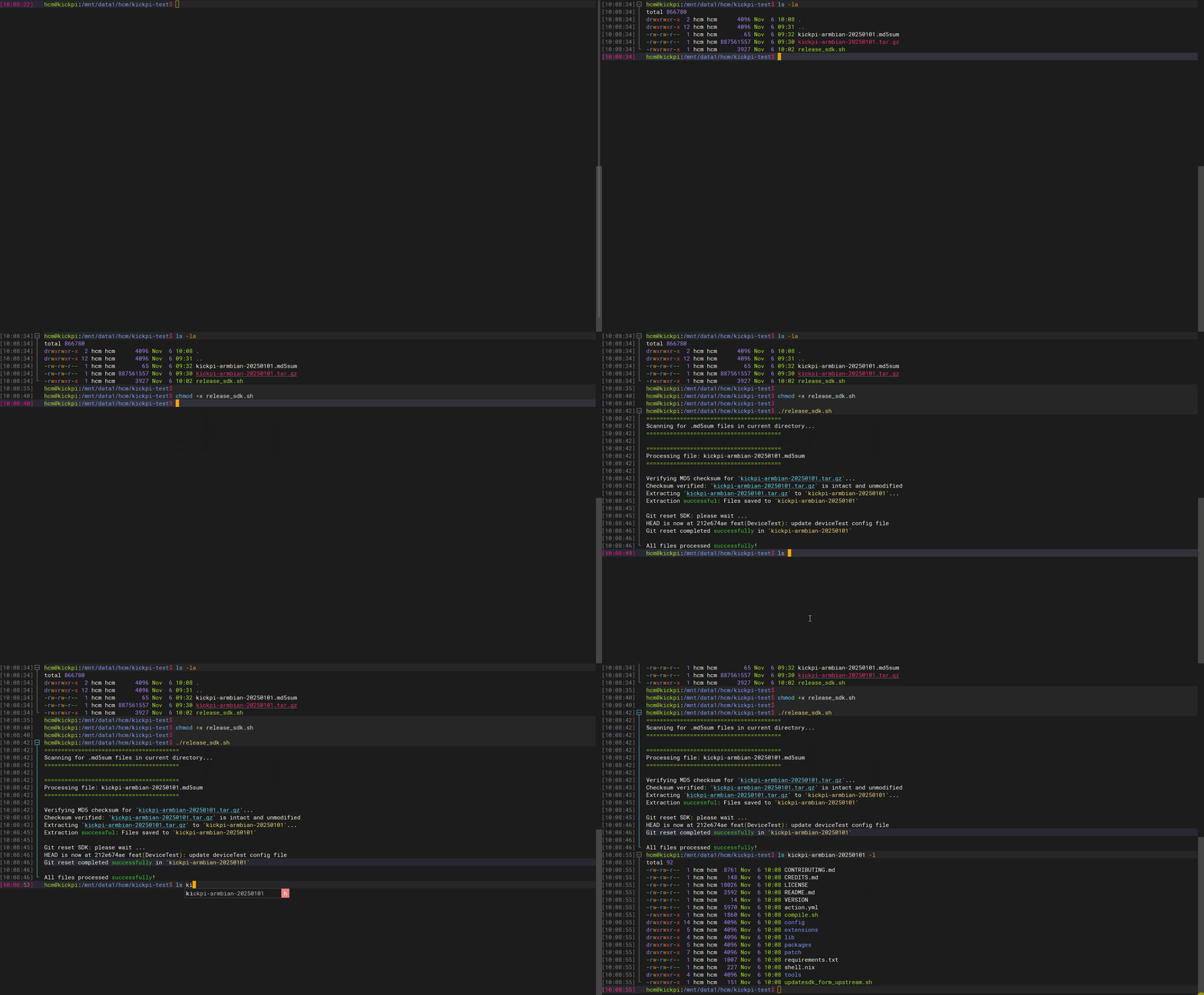
Full Compilation
1. Enter the code path on the compilation host and execute the following command to configure the compilation target:
Select the configuration file according to the board model and SoC.
| Board | SoC | Configuration File |
|---|---|---|
| K1 | rk3568 | BoardConfig-rk3568-kickpi-k1.mk |
| K1B | rk3568 | BoardConfig-rk3568-kickpi-k1b.mk |
| K1 Mini | rk3568 | BoardConfig-rk3568-kickpi-k1Mini.mk |
| K3 | rk3562 | BoardConfig-rk3562-kickpi-k3.mk |
| K3B | rk3562 | BoardConfig-rk3562-kickpi-k3b.mk |
| K8 | rk3588 | BoardConfig-rk3588-kickpi-k8.mk |
| K8C | rk3588 | BoardConfig-rk3588-kickpi-k8c.mk |
| K8D | rk3588s | BoardConfig-rk3588s-kickpi-k8d.mk |
| K11C | rk3566 | BoardConfig-rk3566-kickpi-k11c.mk |
K1 Configuration Example:
./build.sh lunch
will lunch sdk

You're building on Linux
Lunch menu...pick a combo:

1. rk356x
2. rk3588
3. rk3562
Which would you like? [0]: 1

You're building on Linux
Lunch menu...pick a combo:

1. BoardConfig-rk3566-kickpi-tx66.mk
2. BoardConfig-rk3568-kickpi-k1.mk
3. BoardConfig-rk3568-kickpi-k1b.mk
4. BoardConfig.mk
Which would you like? [0]: 2
switching to board: /home/work/rockchip/rk-android13.0/device/rockchip/rk356x/BoardConfig-rk3568-kickpi-k1.mk
2. Full image compilation.
Individual Compilation
- Compile Multi-screen Recognition Image
- Compile Uboot Individually
- Compile Android Individually
- Compile Kernel Individually
- Configure Kernel defconfig
Q&A
- Android compilation error due to path errors caused by code location changes?
Clear the data first, then recompile.
- Insufficient compilation space?
The default building job count is currently -j32. Reducing the jobs, add the -J parameter followed by the jobs to the build command.